We remain fully operational. Our teams are working around the clock to ensure your deliveries continue safely.

DOWNLOAD THE APP


Copyright © 2025 Desertcart Holdings Limited
DOWNLOAD THE APP




Buy anything from 5,000+ international stores. One checkout price. No surprise fees. Join 2M+ shoppers on Desertcart.
Desertcart purchases this item on your behalf and handles shipping, customs, and support to Papua New Guinea.
🎨 Print Bold, Print Precise – Elevate Your 3D Game with YOYI YOYI TPU!
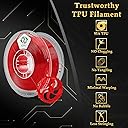
YOYI YOYI TPU 3D Printer Filament offers ultra-precise ±0.03mm diameter accuracy and Shore Hardness 95A for flexible, durable prints. Compatible with nearly all 3D printers, this 0.8kg spool of 100% virgin TPU ensures chemical resistance and consistent quality, backed by a 365-day warranty and REACH certification for professional-grade results.


| ASIN | B01MAWJOWJ |
| Brand Name | YOYI YOYI |
| Color | Red |
| Customer Reviews | 4.5 4.5 out of 5 stars (800) |
| Item Weight | 0.8 Kilograms |
| Manufacturer | YOYI |
| Manufacturer Part Number | TPU |
| Material Type | Tpu |
| Model Number | Flexible TPU001-Transparent Red |
| UPC | 749110382056 |
| Unit Count | 800.0 Grams |
G**N
Muy bien todo, recomendadisimo
A**.
perfecto
M**O
Es un filamento TPU, lo que significa que va a ser mas complicado de imprimir que PLA o ABS. Debes saber es que el TPU es super sensible a la humedad y lo primero que debes hacer al abrirlo es deshidratarlo. Eso garantiza buenos resultados con TPU, ya sea con un deshidratador de comida o uno específico de filamentos, ponlo mínimo unas 2 horas a 60°C y luego ya lo puedes usar (y debes deshidratarlo cada vez que lo vas a usar). Haciendo lo anterior se imprime facil teniendo en cuenta que el TPU se imprime muuy despacio y en un rango un poco mas alto de temperatura que PLA, en mi caso entre 215 y 220 se imprime bien pero debes probar cada rollo. Comparto mis configuraciones de velocidad para dar mejor resultados, ojala le ayuden a alguien. Mi impresora es una Anycubic Kossel Linear Plus, con mods de mejora de rigidez (angulos en los postes superiores/inferiores), mod de base para pelotas de tenis y resortes en los brazos para evitar vibración. Estás mismas configuraciones las use en una ender 3 sin mods y también dan buenos resultados usando TPU sainsmart. La aceleración bajarla a 500mm/s ayuda a evitar que despegue las impresiones aun en PLA. Sin importar la marca de TPU deben imprimir despacio (de 20 a 30mm/s max) y deben hacerlo después de deshidratar el rollo. Esta marca china me dió buenos resultados y se ve increíble, si es rojo translúcido brillante aunque siento es un poco mas flexible/fragil que el de sainsmart que cuesta casi el doble... Si es rollo de 800gr, y lo volvería a comprar.
C**.
To review this filament, I’ve done a series of experimentation to help others to print with such. Overall, it’s a great filament to work with. After further calibration, the results have been fantastic. I would highly recommend this TPU filament Now, I’ll write this for beginners in 3D printing. If you’re just starting and do not know much of the basics of 3D printing, I do not recommend this product. It’s best to start with PLA, as it is very easy to print and learn with. I wouldn’t say that TPU is difficult to deal with, but it is quite tricky. As I experimented with this filament, I noticed that you cannot have the same settings for every piece you print. Nevertheless, it does not mean the filament is bad. Now, this is for experienced and people of normal use and knowledge of 3D printers. As I mentioned before, the filament is great, but it does require a bit of attention. Also, if you’re in a hurry for the print to come out, do not expect that with this filament. Printing with TPU requires a lot of patience and care in order to have a great print. No patience = heavy stringing and ghosting. I would recommend printing a bunch of calibration parts for this filament so you can get to know it. As I mentioned, printing speeds varies depending on the part, but to have a rather “constant” print speed on most prints, I would recommend tweaking the wall thickness and infill. A good TPU print requires higher infill. As I experimented, I observed that good prints will result when adding at least 45% more of the infill of what you would normally print your part with PLA or ABS. If you’d like a good quality, but want the part to be Flexible and not too hard, the best I’d recommend is a 30-35% infill. Keep in mind that if the infill is too low, the part will possibly result to be misshapen, too flexible and wobbly, and end up with high ghosting on the top and/or final layers of the part. Note that the lower the infill, the lower print speed you’ll need to have. As a final evaluation of the experimental parts, I found that the best and average print settings to use are: • 15-20 mm/s print speed (Varies, depending on the part) • 230 Celsius • 44% infill Overall, this filament is a great filament. Also, it is very cheap, compared to the almost $50 TPU filaments out in the market. You’ll basically have the same results with this filament and save a lot. Once again, this is a great filament to have, with pretty fun results.
S**O
Me gustó mucho imprimir con este filamento flexible, había visto que era muy difícil imprimir comparado con el PLA, pero ha sido más fácil, y más rápido... Imprimo al 80 al 100% de velocidad
Trustpilot
3 weeks ago
1 month ago