We remain fully operational. Our teams are working around the clock to ensure your deliveries continue safely.

DOWNLOAD THE APP


Copyright © 2025 Desertcart Holdings Limited
DOWNLOAD THE APP
Buy anything from 5,000+ international stores. One checkout price. No surprise fees. Join 2M+ shoppers on Desertcart.
Desertcart purchases this item on your behalf and handles shipping, customs, and support to Papua New Guinea.
🔩 Crimp like a pro, connect like a boss.
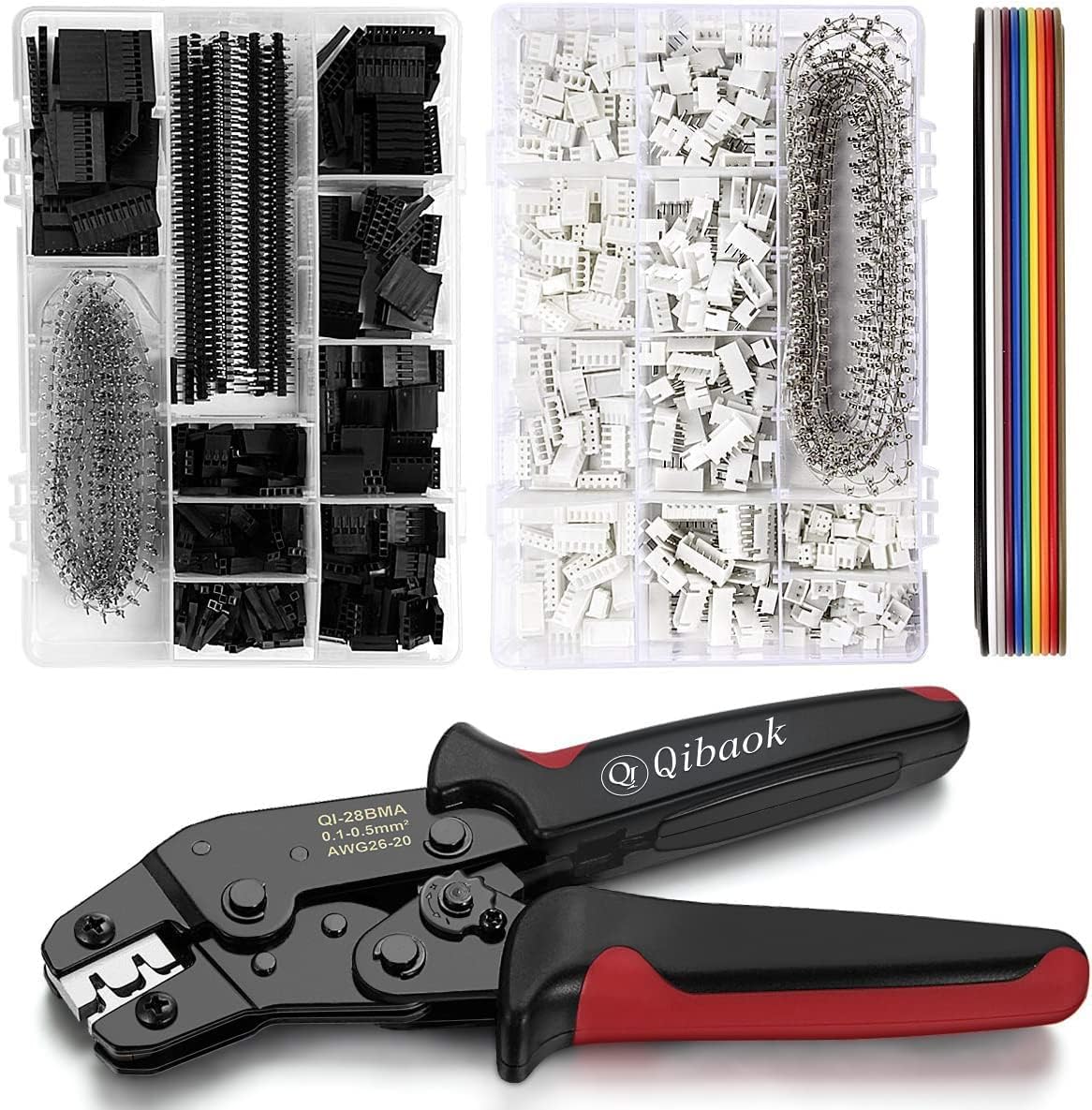
The Qibaok Crimping Tool Kit combines a robust ratcheting crimper with an extensive set of 1550 Dupont and 760 JST-XH 2.54mm connectors, designed for AWG 26-20 wires. Crafted from high-quality alloy steel and ABS, it delivers precise, energy-saving crimps ideal for DIY electronics, industrial projects, and home improvements. This ergonomic, versatile kit ensures professional-grade results with every use.


| ASIN | B07ZK5F8HP |
| Best Sellers Rank | #85,593 in Tools & Home Improvement ( See Top 100 in Tools & Home Improvement ) #297 in Crimpers |
| Brand | Qibaok |
| Brand Name | Qibaok |
| Color | Black, Red |
| Customer Reviews | 4.5 out of 5 stars 1,393 Reviews |
| Grip Type | Ergonomic |
| Handle Material | Acrylonitrile Butadiene Styrene (ABS) |
| Included Components | 1550 PCS 2.54mm dupont connectors,760 PCS 2.54mm JST-XH connectors,1.5m 10-wire ribbon cable |
| Item Dimensions L x W | 10.1"L x 5.7"W |
| Item Type Name | Wire Crimper Tool Kit for AWG 26-20 |
| Item Weight | 2.2 Pounds |
| Manufacturer | Qibaok |
| Manufacturer Part Number | Qibaok536 |
| Model Number | Qibaok536 |
| Product Dimensions | 10.1"L x 5.7"W |
| Size | Crimper Tool for AWG 26-20 & Connectors Kit |
| Specific Uses For Product | DIY electronics, industrial, home improvements, XH 2.54mm, C3-R 2.54mm, Dupont Pins 2.54mm, JST type connectors, EPS, PCIE, SATA connections |
| UPC | 674862315017 |
| Unit Count | 1 Count |
J**R
Works far better than I expected
The Crimp Tool: I've used OEM crimp tools for many years (decades actually). I didn't know what to expect from a generic tool. Much to my surprise, this really works well with one slight issue. I found this works excellent on the DuPont crimps and on Molex 08-50-0114 crimp terminals. For the PST style, it works but takes more practice on figuring out where to align the pin for best crimping, since the head is a bit too wide for this terminal (as is almost every crimp tool I have seen). It might take a little adjusting of the tool setting to get it right but now I hit very close to 100% perfect crimps each time. The handles are very comfortable, and the operation is smooth. It is a robust and well-made tool. As for the Dupont and JST headers, they all worked great with no issues. Both may be generic rather than OEM (I honestly don't know) but they still work fine. I've used hundreds of them so far. The assortments provided were an excellent starting point until you see which sizes you need most. And it is nice to have an assortment for prototypes and the occasional repair.
C**T
Hopefully helpful crimping JST newbie tips.
Please be gentle I'm a crimping newbie and probably using the wrong terminology ;-) I've found that you can successfully crimp JST-XH connectors but you MUST be careful and VERY precise, I'd say the tolerance is less than .1 mm. The biggest problem that I've run into is that if you're not careful you'll mangle the connector or flatten the "tang" that holds the connector in place in the JST header. The solution is to make sure that the connector is properly placed into the crimper jaws before crimping. Here are some tips that I hope will help and I've attached a couple of pics. - I think that whether you use the 1st or 2nd set of crimper "teeth" depends more on the gauge of the wire you're using than whether you're crimping JST or Dupont connectors. I've been using 24awg wire so I used the 1st set of larger teeth (closest to the mouth of the crimper). - I find that before inserting the connector into the crimper jaws pinching the connector wings that hold the wire insulation so that they're closer to parallel (instead of V shaped) makes things a little easier. - The biggest thing to watch out for is that the tang (see attached pics) protrudes from the opposite side of the jaws before crimping. If not the connector will be mangled or the tang flattened so it won't hold in the header. I hope this helps and good luck.
B**R
Learning curve, skill deveolpment and patience are necessary
As an electronic enthusiast, I relish the idea of creating usable devices with easy assembly. This many times includes jumpers for connections between custom circuit boards. This crimping tool along with the connector assortment appeared to fill the need. The crimping tool is well made. The assortment of included connectors is nice and appear to be of "acceptable" quality. Initially, about 1 in 3 attempts at using the tool resulted in a successful jumper. However, as I continued practicing, my percentage of success improved to about 8 successes and 2 failures per 10 jumpers attempted, or about 80%. Still more wastage than I would like, but acceptable. I feel like the more I use this crimping tool, the better I'll get... We'll see.
M**S
Professional Quality Terminals
I own about 10 terminal crimpers and this one is BY FAR the best. if you strip the wire the correct length, you can't tell the difference between factory crimps and DIY crimps. Watch a video on how to use this! You'll be making factory quality crimps in no time.
M**Y
Great Tool at a great value
This crimp has been a life saver. I got it just for a small project, but it worked out so great, I am starting to use it for all sorts of electrical projects. While there are probably much better crimping tools out there, the prices are outrageous! This is a solid crimp with a full set of supplies for 1/2 to 1/10 of the price of some of the others I have seen. HIGHLY RECOMMEND!
A**R
Finally have one that works !!!!!
I do a lot of prototyping with STM32, AVR and others. I have tried two other "multi-connector" crimpers that do a good job on heavier connectors, but when it comes to the DuPont style neither has worked. Because the jaws are too thick, they distort or crush the connectors. And I've had a LOT of practice trying. This one does not crush or distort anything -- because the jaws are much thinner than my other ones. It simply worked on the first try. Now to be fair, beginners who have not crushed and destroyed as many connectors as I have might need a little practice. For me, from the first crimp everything worked perfectly. If you do arduino/raspberry/etc and use DuPont-style connections, this is the one to get. But note that it only fits two sizes, unlike one of my other kits which destroys DuPonts but does a ton of other crimps. Thanks to the great success I've had with this tool in the last day, I'm considering milling down the replaceable jaws on one of my other tools to see if I can make that one functional.
W**J
Great for hobbyist
It took a bit of learning how to use the crimping tool but quickly picked a method of use to make life easy for me. Here is what I do, keeping in mind I've only used the Dupont connectors. On the connectors are some points, two near the back and two more a bit further up, with those facing up it into the valley portion of the crimp tool. Carefully squeeze the down 2 clicks, this should put just enough pressure to hold the connector in place allowing you to insert the wire. Make sure the exposed portion of the wire is not too far forward. The back pins clamp down on the insulated part of the wire while the other grab the wire itself. Once you're satisfied with your alignment, and making sure your fingers and skin is clear of the crimping area, squeeze down all the way and you're down. The hard part is over. As for inserting the connector into the holder, there is a little tab on one side of the connector make sure that side is inline with the hole that's on the holder. Just slide it in all of the way and give it a slight pull back to feel if it's seated. Don't worry if it pulls back a bit, that's normal. I haven't worked with the JST-XH connectors yet. Make sure with Dupont you're using the crimp slot that is furthest back, look at the product images to see which one I mean. I saw someone doing a review of this exact tool on Youtube and they used the other slot. I haven't actually tried to see if it makes much of a difference but it looks like it should.
G**T
Guillotines about 50% of the wires.
The crimper crimps the cable too closely, causing the wire to become pinched and will often break off completely. There appears to be a tension knob on the side to make it looser, but it does not change any settings. I tried every setting of the knob and the distance between the two jaws when the crimper closed did not change (I checked it with accurate measuring wires). Prior to purchasing this I read that there would be a learning curve, so I expected to mess up a few crimps, but after about 75 crimps I still guillotining about 50% of the wires. Since the problem is intermittent, the problem might be user error, but I tried everything I know how to in an effort to figure out why it cuts 50% of the wires, all to no avail. Personally, I think its sloppy engineering/manufacture, but I guess one gets what one pays for. Not recommended. When it works, it does a good job by the way which is why I gave it three stars instead of one. .
Trustpilot
1 day ago
2 weeks ago